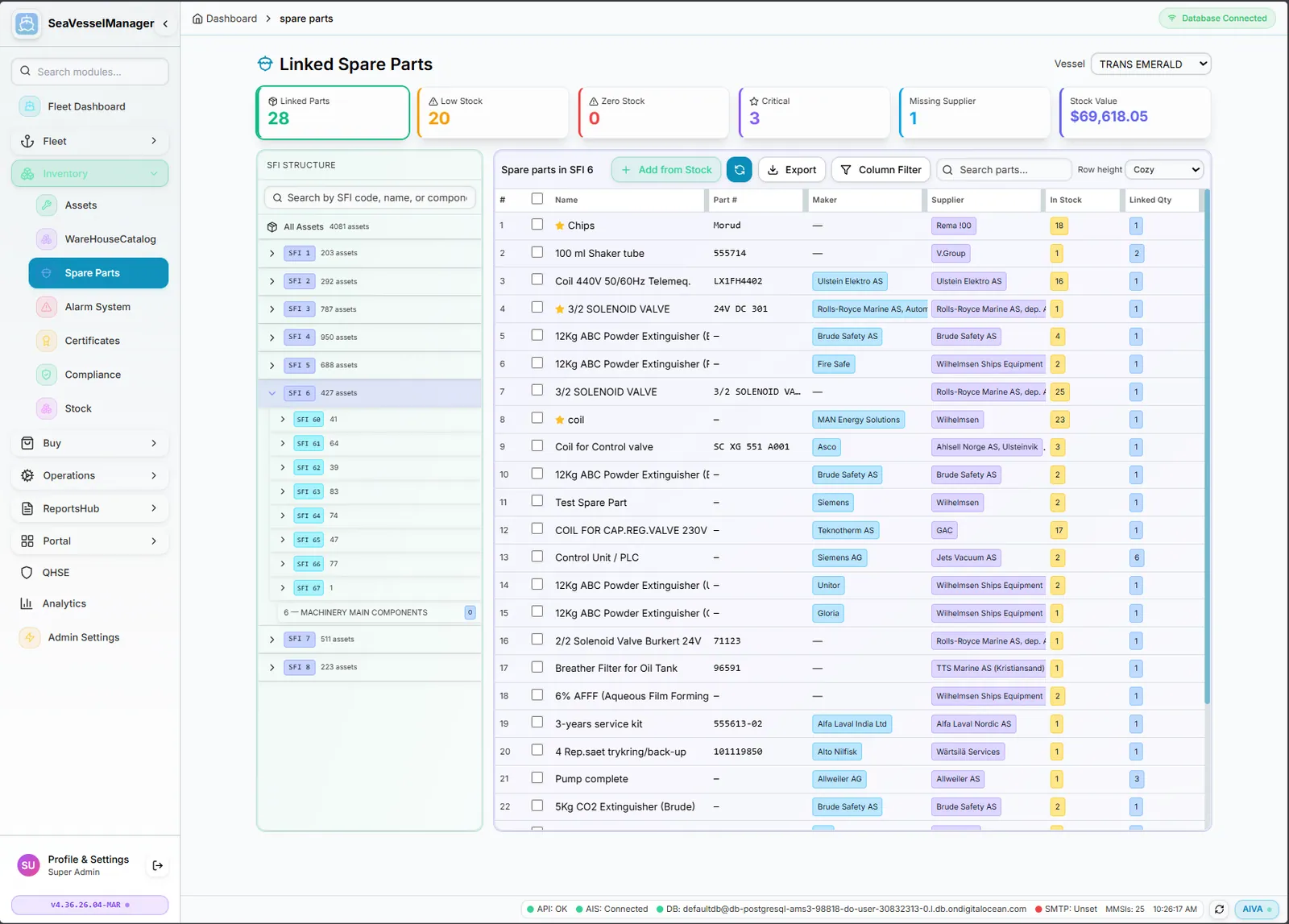
Vessel-specific allocation with stock monitoring
Spare parts are allocated per vessel and linked to the equipment that uses them. You always see what is in stock, what is running low and which parts are critical, from the part down to the component.
Pick a vessel and see only its parts, with part number, maker, supplier, quantity in stock and linked quantity.
Select a piece of equipment in the SFI tree to see the spare parts linked to it. Go the other way and open a stock item to see which equipment uses it.
KPI cards for linked parts, low stock, zero stock, critical parts, missing supplier and stock value keep problems visible.
Search parts, combine column filters such as part name and supplier, and export the list. Zero-stock parts can be included when you need them.
Look up maker catalogue items by category and part number and read their reference, stock and price information.
Flag critical parts and keep supplier details with each part. The Missing Supplier KPI shows where the record is incomplete.
Low-stock and reorder-required counts show what needs ordering, and the same supplier data flows into the Purchasing module.
Learn how it works in the official documentation. The guides themselves are in English.
Real-time fleet overview with live telemetry and fleet-wide KPIs
SFI-based classification for all ship components
Work order management with preventive scheduling
Track certificates with expiry alerts
Advanced analytics with dashboards
Procurement workflow from requisition to PO
Plan voyages with port calls, cargo and fuel
Crew records, certificates, availability and hours of rest
Plan a dry-docking from specification to yard quote
Cargo manifests for every voyage
Medical stock, kits and inspections
Move equipment between vessels and keep its history
Checked running-hours counters that drive maintenance
Incidents, inspections and corrective actions
A document library with versions and approval
Class surveys, findings and requirements
Can the vessel sail? The status and what blocks it
Role-based access control
Book a demo or request free access. No credit card required.